
Integrate Taboola into DashThis
Taboola connects with a pair of API keys: a Client ID and a Client Secret. One source is one Taboola advertiser account. If your keys belong to a network account, DashThis lists every advertiser account in that network, and you add each one as its own Taboola source.
API keys: you generate them yourself on the API Keys page of your Taboola account. Taboola API keys expire one year after they are created, so you will need a new pair once a year.
Connect your account
- Go to DashThis and open your integrations page.
- Scroll or search through the list of available integrations and click ADD + beside Taboola.

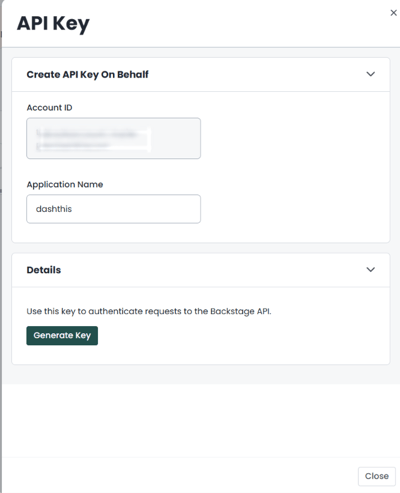
- Generate your API keys: on your Taboola API Keys page, click + New, enter DashThis as the Application Name so you can recognize the key later, then click Generate Key. Copy the Client ID and Client Secret it shows.
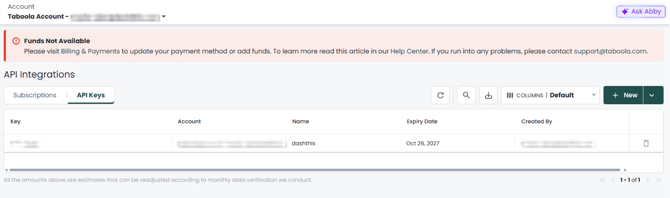
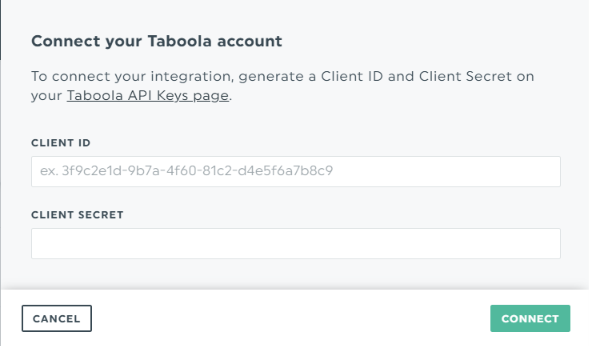
- Paste your Client ID into the Client ID field and your Client Secret into the Client Secret field, then click Connect. DashThis names the connection after your Taboola account.
- Choose the advertiser account you want to report on and name your source. This is how the source will be labeled in DashThis.
Good to know
- One advertiser account per source. To report on several Taboola accounts, add each one as a separate Taboola source.
- Keys rejected? If DashThis says "The Client ID or Client Secret you've entered is not valid", check that you copied both values in full. Taboola API keys expire one year after they are created, so you may need to generate a new pair under API Keys.
- New keys keep your widgets. When you replace expired keys, update the Taboola integration in DashThis and enter both the new Client ID and the new Client Secret, then click Save. Your sources and widgets stay as they are.
- Taboola busy? If DashThis says "Taboola is rate-limiting requests. Try again in a minute.", wait a minute and click Connect again.
Need help with Taboola?
Contact our Support Team here 💪🏼
What's next?